Who uses Workout Note to Improve
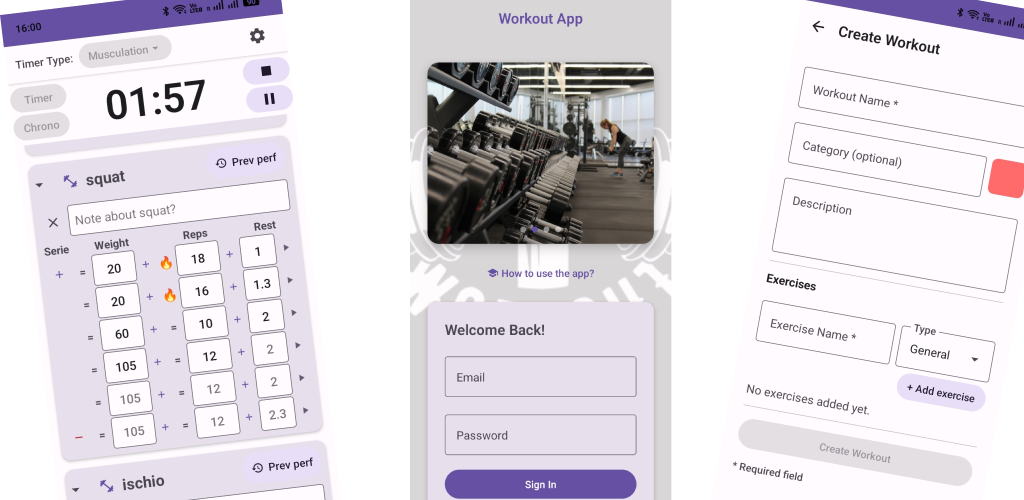
Solo lifters log squat, bench, and accessory work with a rest timer
and a note field on every exercise. Personal trainers and strength
coaches use the same app to store one category per client,
color-code programs, and pull up the right session from the search
bar — by workout name, category, or client.
Popular searches this app answers: workout journal Android, gym notes
app, personal trainer workout log, client training tracker, exercise
note taking, rest timer between sets, coaching app for lifters, and
searchable workout library on phone.
People also ask
Where can I download Workout Note to Improve?
Workout Note to Improve is free on Google Play for Android. Open
the Play Store listing and tap Install — no tester signup required.
Is Workout Note to Improve free?
Yes. The Android app is free to install from Google Play.
Can I use categories as client names?
Yes. Create a category for each athlete or client, then save
their workouts inside it — push/pull split, rehab block, or
meet prep all stay grouped under their name.
What are color tags for?
Tags add a quick visual label — priority client, deload week,
template vs live session — so you scan your list faster than
reading every title.
How does workout search work?
The search bar matches training names, categories, and client
labels. Type a client’s name or “leg day” and jump straight to
the routine you need on the floor.
Is it only for coaches?
No. The same timer, set log, and per-exercise notes work for
anyone training alone. Categories and search just scale up when
you manage multiple people.
Coach workflow in short
- Create a category named after the client.
- Build or duplicate their workout template inside it.
- Tag it with a color if you use phases or priorities.
- Run the session, log sets, add notes per exercise.
- Search by client or workout name before the next appointment.